This is really a good news for me at the time of my marriage. Mobee.in entered into press. Our CEO Dashratham Bitla has been interviewed for the press.
These are some of the links related to the press.
http://www.indiaprwire.com/print/?type=pressrelease&id=2009021119556
http://muralilistening.blogspot.com/2009/02/dasharatham-bitla.html
Tuesday, March 3, 2009


Saturday, February 21, 2009
My mariage Invitation
I have developed a website for my marriage. Its http://harishwedslavanya.info
I tried to post all teh details there it self also I tried to post an individual email to every one. Every one is invited to my marriage. The following is the invitation.
"Marriage is the union of two unknown souls, written at Heart
settled in Heaven and celebrated on Earth,
on moving wheels of life"
Solicit your esteemed presence with family and friends on the occasion of my marriage with
Lavanya
On Sunday the 1st March, 2009 @ 7:30 a.m.
at Sri Gokul Kalyana Mandapam A.C,
Eluru
Reception & Lunch
starts by 12 noon.
http://harishwedslavanya.info

Regards,
Harish
I tried to post all teh details there it self also I tried to post an individual email to every one. Every one is invited to my marriage. The following is the invitation.
"Marriage is the union of two unknown souls, written at Heart
settled in Heaven and celebrated on Earth,
on moving wheels of life"
Solicit your esteemed presence with family and friends on the occasion of my marriage with
Lavanya
On Sunday the 1st March, 2009 @ 7:30 a.m.
at Sri Gokul Kalyana Mandapam A.C,
Eluru
Reception & Lunch
starts by 12 noon.
http://harishwedslavanya.info
Regards,
Harish
Saturday, December 20, 2008
Changes from Rails 1.2.3 to Rails 2.2.2
After a long time we have changed one of our project from Rails 1.2.3 to Rails 2.2.2 .
Steps to follow for migrating.
1. Get the latest Instant Rails
2. gem install rails (This will get the latest version (now its 2.2.2))
3. gem update --system (This will update your gems)
4. rake rails:freeze:edge (This will freeze your application to the new version. This will require svn installed)
Later start the server, then you will definitely face some problems with your old application.
The problems(with solutions) I faced while migrating are,
1. Error: undefined method `cache_template_extensions=' for ActionView::Base:Class
When you try to start the server, you will get this error.
cache_template_extensions is deprecated. so you need to remove config.action_view.cache_template_extensions = false in config/environments/development.rb
2.
*******************************************************************
* config.breakpoint_server has been deprecated and has no effect. *
*******************************************************************
This warning will appear, you need to remove config.breakpoint_server = true in development.rb
3. NameError: uninitialized constant Inflector
This will appear if your environment.rb or any other place including your old plugins consisits of
Inflector.inflections do |inflect|
end
This is actually deprecated. If you find any of these issues in plugins kindly update your plugins with your latest versions.
4. NameError: uninitialized constant Rails::Plugin::Dependencies
This will come if you use any old gems, Actually Dependencies are deprecated to ActiveSupport::Dependencies, so you can change this in your code.
These are the main issues i found while starting the server. But after starting the server you will find so many issues to fix. You need to fix them accordingly with Rails 2.2.2.
Steps to follow for migrating.
1. Get the latest Instant Rails
2. gem install rails (This will get the latest version (now its 2.2.2))
3. gem update --system (This will update your gems)
4. rake rails:freeze:edge (This will freeze your application to the new version. This will require svn installed)
Later start the server, then you will definitely face some problems with your old application.
The problems(with solutions) I faced while migrating are,
1. Error: undefined method `cache_template_extensions=' for ActionView::Base:Class
When you try to start the server, you will get this error.
cache_template_extensions is deprecated. so you need to remove config.action_view.cache_template_extensions = false in config/environments/development.rb
2.
*******************************************************************
* config.breakpoint_server has been deprecated and has no effect. *
*******************************************************************
This warning will appear, you need to remove config.breakpoint_server = true in development.rb
3. NameError: uninitialized constant Inflector
This will appear if your environment.rb or any other place including your old plugins consisits of
Inflector.inflections do |inflect|
end
This is actually deprecated. If you find any of these issues in plugins kindly update your plugins with your latest versions.
4. NameError: uninitialized constant Rails::Plugin::Dependencies
This will come if you use any old gems, Actually Dependencies are deprecated to ActiveSupport::Dependencies, so you can change this in your code.
These are the main issues i found while starting the server. But after starting the server you will find so many issues to fix. You need to fix them accordingly with Rails 2.2.2.
Wednesday, October 29, 2008
How to get emails from your india times account to your mobile?
Its quite easy to access your emails from India Times on your mobile than you think. You can actually READ, REPLY, REPLYALL right from your mobile itself.
Open indiatimes and login with your user name and password.
After logging into your account, Click Preferences tab. There you can find Mail Tab.
In that tab select Forward a copy to: and type your mobee.in email adress. ie., 9198xxxxxx@mobee.in and click save. See the below image for reference.
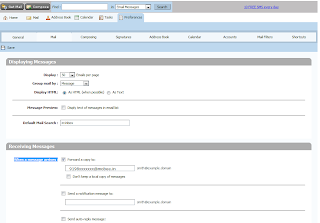
Thats it. mobee.in takes care of the rest.
Then automatically your email will be sent to your mobile as SMS.
Open indiatimes and login with your user name and password.
After logging into your account, Click Preferences tab. There you can find Mail Tab.
In that tab select Forward a copy to: and type your mobee.in email adress. ie., 9198xxxxxx@mobee.in and click save. See the below image for reference.

Thats it. mobee.in takes care of the rest.
Then automatically your email will be sent to your mobile as SMS.
Saturday, October 25, 2008
Clearing the Email in the logs in Ruby on Rails.
Are your logs printing the complete email when you are sending using Action Mailer in ROR?
By default your Action Mailer will print the log when an email is being sent. So to Avoid this add the following line in envionment.rb where you initialize.
ActionMailer::Base.logger = nil
This should look like below.
ActionMailer::Base.delivery_method = :smtp
ActionMailer::Base.perform_deliveries = true
ActionMailer::Base.raise_delivery_errors = true
ActionMailer::Base.default_charset = "utf-8"
ActionMailer::Base.logger = nil #this will prevent you by printing in the log.
So this will prevent by printing in all the logs.
By default your Action Mailer will print the log when an email is being sent. So to Avoid this add the following line in envionment.rb where you initialize.
ActionMailer::Base.logger = nil
This should look like below.
ActionMailer::Base.delivery_method = :smtp
ActionMailer::Base.perform_deliveries = true
ActionMailer::Base.raise_delivery_errors = true
ActionMailer::Base.default_charset = "utf-8"
ActionMailer::Base.logger = nil #this will prevent you by printing in the log.
So this will prevent by printing in all the logs.
Mobee.in Status
Mobee.in registrations are happening like Sehwag scoring runs in cricket :). We actually not yet started the marketing. Even though registrations are very fast with out any ads/marketing. Hope we will get more number of users after we start the real time marketing.
The response from the registered users is "WOW", "AWESOME", "FANTASTIC" etc., :)
Our team is very happy for the starting success and need to see more and more happiness.
The response from the registered users is "WOW", "AWESOME", "FANTASTIC" etc., :)
Our team is very happy for the starting success and need to see more and more happiness.
Saturday, October 4, 2008
Sending Email with attachment in Ruby on Rails using Gmail Account
Its very important to send an email with attachment in Ruby on Rails. Generally most of the applications use this.
I'll write you step by step procedure.
For sending an email you need to to specify the mailer details in environment.rb
require 'smtp_tls' #this is used for GMAIL . click here to get this file. Copy this file in your lib folder.
# ActionMailer Settings
ActionMailer::Base.delivery_method = :smtp
ActionMailer::Base.perform_deliveries = true
ActionMailer::Base.raise_delivery_errors = true
ActionMailer::Base.default_charset = "utf-8"
ActionMailer::Base.logger = nil #this will prevent you by printing in the log.
ActionMailer::Base.smtp_settings = {
:address => "smtp.gmail.com",
:port => 587,
:domain => "gmail.com",
:authentication => :login,
:user_name => "username@gmail.com",
:password => "your assword",
}
To use ActionMailer, you need to create a mailer model.
$ script/generate mailer SendMail
This will create the model file app/models/send_mail.rb
Where ever you want to call the mailer method,
SendMail.deliver_send_attachment(subject, message, document)
"deliver_ " will deliver the email specified with the method.
"send_attachment" method should be in send_mail.rb (model)
In you models app/models/send_mail.rb
class SendMail < ActionMailer::Base
def send_mail(subject, message, document)
@from = "your email"
@subject = subject
@body['message'] = message #@body["message"] here @message will be the instance variable
@recipients = "some email" #recipient email
content_type "text/html"
@sent_on = Time.now
unless document.nil?
part :content_type => document.content_type do |p|
p.attachment :content_type => document.content_type,
:body => File.open("./public/#{your file name}", 'rb') { |f| f.read },
:filename => document.filename
end
end
@layout = :some layout
end
end
In the above code for the attachment I passed document object, in which content type (image, doc, pdf etc.,)is saved.
generally the content type will be
"application/msword" -> for MSword
"application/pdf" -> for MSword
"image/gif" -> for gif images
Instead of document.content_type you hard code it by the type mentioned above.
eg:
part :content_type => "application/pdf" do |p|
p.attachment :content_type => "application/pdf",
:body => File.open("./public/#{your file name}", 'rb') { |f| f.read },
:filename => "file_name"
end
In your views app/views/send_mail/send_attachment.rhtml
Hi some name,
This is the message <%= @message %>
Yours truly,
blah blah.
This will send an email with the attachment using Gmail.
I'll write you step by step procedure.
For sending an email you need to to specify the mailer details in environment.rb
require 'smtp_tls' #this is used for GMAIL . click here to get this file. Copy this file in your lib folder.
# ActionMailer Settings
ActionMailer::Base.delivery_method = :smtp
ActionMailer::Base.perform_deliveries = true
ActionMailer::Base.raise_delivery_errors = true
ActionMailer::Base.default_charset = "utf-8"
ActionMailer::Base.logger = nil #this will prevent you by printing in the log.
ActionMailer::Base.smtp_settings = {
:address => "smtp.gmail.com",
:port => 587,
:domain => "gmail.com",
:authentication => :login,
:user_name => "username@gmail.com",
:password => "your assword",
}
To use ActionMailer, you need to create a mailer model.
$ script/generate mailer SendMail
This will create the model file app/models/send_mail.rb
Where ever you want to call the mailer method,
SendMail.deliver_send_attachment(subject, message, document)
"deliver_ " will deliver the email specified with the method.
"send_attachment" method should be in send_mail.rb (model)
In you models app/models/send_mail.rb
class SendMail < ActionMailer::Base
def send_mail(subject, message, document)
@from = "your email"
@subject = subject
@body['message'] = message #@body["message"] here @message will be the instance variable
@recipients = "some email" #recipient email
content_type "text/html"
@sent_on = Time.now
unless document.nil?
part :content_type => document.content_type do |p|
p.attachment :content_type => document.content_type,
:body => File.open("./public/#{your file name}", 'rb') { |f| f.read },
:filename => document.filename
end
end
@layout = :some layout
end
end
In the above code for the attachment I passed document object, in which content type (image, doc, pdf etc.,)is saved.
generally the content type will be
"application/msword" -> for MSword
"application/pdf" -> for MSword
"image/gif" -> for gif images
Instead of document.content_type you hard code it by the type mentioned above.
eg:
part :content_type => "application/pdf" do |p|
p.attachment :content_type => "application/pdf",
:body => File.open("./public/#{your file name}", 'rb') { |f| f.read },
:filename => "file_name"
end
In your views app/views/send_mail/send_attachment.rhtml
Hi some name,
This is the message <%= @message %>
Yours truly,
blah blah.
This will send an email with the attachment using Gmail.
Subscribe to:
Posts (Atom)